Architecture Acrobat
Design and Development of a 2D Platformer Game: A Software Engineering Educational Tool
Abstract
This document delineates the systematic approach employed in the design and development of a 2D platformer game set within an urban environment. Crafted as an educational tool for computer science students, the project integrates various programming design patterns to impart fundamental software engineering principles. The process encompasses comprehensive research, game design, and implementation stages. By adhering to industry-standard methodologies, the project aims to provide students with a showcase of representational application of design patterns in software development.
Introduction
Teaching principles of software engineering and furthermore design patterns, as is usually planned in the first few semesters of computer science study programmes, requires not only a high level of understanding by the lecturer, but also quite a few creative ideas on how to show those abstract concepts in use. Most projects that can make use of a multitude of design patterns become blown out of proportion, and cannot be explained to students easily. Due to a high amount of features within single projects, game development has proven itself as a field that can usefully employ various design patterns. A video game with widely-known mechanics is therefore a great candidate to show off principles of software engineering, with the code base remaining small enough to be used and understood in university classes.
With this in mind, the aim of this project is to create a very simple, yet still enjoyable game, using design patterns during development where it is possible and needed. To realize this objective, the project navigates through the phases of research, design, implementation, documentation and deployment.
Research
The research phase of the project is a pivotal stage in laying the groundwork for the successful implementation of a simple game. This chapter encompasses a multifaceted exploration aimed at evaluating game development tools and frameworks, understanding software engineering principles, identifying suitable design patterns, and reviewing existing game projects.
Tools and Frameworks
The project is set to be built using the Java programming language. This selection is based on the requirement outlined in the initial project planning. However, Java is also a robust and versatile language that’s widely used in various fields. Several tools and frameworks are available that can streamline the process of creating a game in Java.
One such tool is the Lightweight Java Game Library (LWJGL). This powerful framework provides a simple and high-performance platform that unifies the interfaces to various libraries for windowing, audio, and controllers, such as OpenGL, OpenAL, and OpenCL. It offers direct access to native APIs for graphics, audio, and user inputs, which can contribute to creating a rich gaming experience.
Another popular choice is the Java library LibGDX. This open-source game development framework provides a unified API that works across all supported platforms. LibGDX offers a comprehensive set of development capabilities, including graphics, audio, file I/O, input handling, and more. Its scene2d module is particularly useful for creating 2D games, as it offers a stage/actor metaphor for compositing graphical elements and handling user input.
Lastly, there’s jMonkeyEngine, a game engine made especially for modern 3D development, as it’s shader-based, and uses OpenGL for rendering. jMonkeyEngine is not just a visual RPG Maker or an FPS modder. It’s a full-fledged game development suite, which is more than capable of powering commercial games.
All these tools provide robust support for game development in Java, and their selection can be based on the specific needs and requirements of the project.
LibGDX was selected for this project due to its comprehensive set of development capabilities, especially for 2D games, including graphics, audio, file I/O, and input handling. Importantly, LibGDX provides a unified API that works across all supported platforms, facilitating the development process.
Exploration of Design Patterns
“A design pattern names, abstracts, and identifies the key aspects of a common design structure that make it useful for creating a reusable object-oriented design. The design pattern identifies the participating classes and instances, their roles and collaborations, and the distribution of responsibilities. Each design pattern focuses on a particular object-oriented design problem or issue. It describes when it applies, whether it can be applied in view of other design constraints, and the consequences and trade-offs of its use” (CITE: Design Patterns: Elements of Reusable Object-Oriented Software, p. 3f). In the following sections, the research for a selection of Design Patterns is summarized shortly. The selection has been made based upon the patterns described in the second chapter of (CITE: Game Programming Patterns), which was used as the main resource during this phase. Another factor for the selection stems from previous experience with game development.
Singleton
A singleton is a creational design pattern, which means it concerns itself with the process of object creation (CITE: Design Patterns: Elements of Reusable Object-Oriented Software, p. 10f). A singleton ensures a class only has one instance, and provides a global point of access to it (CITE: p.127). This is useful “when a class cannot perform correctly if there is more than one instance of it” (CITE: p. 354). A few common examples are file system APIs, logging and, specifically in the case of games, audio systems. A basic singleton implementation in Java looks like this:
public class Singleton {
		private static Singleton instance;
		private Singleton() {}
		private static Singleton getInstance() {
				if (instance == null) {
            instance = new Singleton ();
        }
        return instance;
		}
}
Although the Singleton pattern is one of the first to be taught in university classes, it has made its way into the realm of “antipatterns” for various reasons:
Singletons are - in a way - global variables, which are an anti-pattern in themselves. They encourage coupling, aren’t concurrency friendly (which is big drawback for game development), and they complicate debugging processes. Anything that happens to a singleton can happen from anywhere within the rest of the codebase, which makes it hard to reasonably track what happens to global data. (CITE: gpp 108). Testing a singleton, or mocking it, therefore becomes a challenge as well. (CITE: https://puredanger.github.io/tech.puredanger.com/2007/07/03/pattern-hate-singleton/ )
The singular instance of a singleton is only created upon first access of the getInstance() method, which is called Lazy initialization. This is especially problematic for game development, as games are usually developed to have high control over their CPU and memory usage. (CITE: gpp p111)
Additionally, the singleton patterns is often used as a solution to an assumed problem. Rarely is it absolutely necessary to have only one instance of a class, and even if the necessity is there, that might change in the future. Since singletons act like global variables, refactoring is a tough task. (CITE: https://www.michaelsafyan.com/tech/design/patterns/singleton )
As is discussed in the above sources, there are a few more reasons, why the usage of a singleton should be well thought out. Nevertheless, the design pattern should be shown to computer science students, but also giving a fair warning of the mentioned issues. Therefore, the singleton pattern should be included in this project - if possible - while directly showing the (negative) consequences of using it.
Command
The Command pattern encapsulates “a request as an object, thereby letting you parameterize clients with different requests, queue or log requests, and support undoable operations” (p.233). In other words, a Command is a method call wrapped in an object, or an “object-oriented replacement for callbacks” (CITE: gpp, p.36). It is a behavioural pattern, and therefore characterizes “the ways in which classes or objects interact and distribute responsibility” (CITE: dp, p10).
A simple example could look like this:
public interface Command {
    void execute();
}

public class JumpCommand implements Command {
    public void execute() {
        // Code to make character jump
    }
}

public class DuckCommand implements Command {
    public void execute() {
        // Code to make character duck
    }
}

public class InputHandler {
    private Command buttonX;
    private Command buttonY;

    public InputHandler() {
        buttonX = new JumpCommand();
        buttonY = new DuckCommand();
    }

    public void handleInput(String buttonPressed) {
        if (buttonPressed.equals("X")) {
            buttonX.execute();
        } else if (buttonPressed.equals("Y")) {
            buttonY.execute();
        }
    }
}
For Java, this specific case can easily be achieved with the Runnable interface, although the naming might be misleading. Java 8 also introduced functional interfaces, which “provide target types for lambda expressions and method references” (CITE: https://docs.oracle.com/javase/8/docs/api/java/util/function/package-summary.html) . These allow the usage of method parameters or return values.
The command pattern is useful for storing and possibly undoing/redoing the contained method calls. In games, the pattern is also often used for input handling and AI.
Observer
The Observer pattern is a behavioral design pattern that defines “a one-to-many dependency between objects, so that when one object changes state, all its dependents are notified and updated automatically” (CITE: dp ,p313). This promotes loose coupling between interacting objects, as the Subject doesn’t need to know anything about its Observers. Observers are also an underlying element of the Model-View-Controller architecture (CITE: gpp, p62).
public interface Observer {
    void update();
}

public class ObserverImplementation implements Observer {
    public void update() {
        // react to the update
    }
}

public class Subject {
    private List<Observer> observers = new ArrayList<Observer>();

    public void addObserver(Observer observer) {
        observers.add(observer);
    }

    public void removeObserver(Observer observer) {
        observers.remove(observer);
    }

    public void notifyObservers() {
        for (Observer observer : observers) {
            observer.update();
        }
    }
}
“Observer is so pervasive, that Java put it in its core library (java.util.Observer)” (CITE: gpp, p62). This has been deprecated with Java 9 though, because the interface doesn’t “provide a rich enough event model for applications. For example, they support only the notion that something has changed, but they don’t convey any information about what has changed. There are also some thread-safety and sequencing issues that cannot be fixed compatibly.” (CITE: https://bugs.openjdk.org/browse/JDK-8154801)
. Instead it is now recommended to use the java.beans library, more specifically java.beans.PropertyChangeListener.
In the context of game development, the Observer pattern can be utilized in a multitude of scenarios. For instance, it can be used to notify various game components about events such as player actions, game state changes, or achievements. It can also be used to update UI elements in response to changes in game data, such as the player’s score or health.
However, careful consideration should be given to the extensive use of the Observer pattern, as it can lead to complex dependencies that are hard to track, making debugging more challenging (CITE: p78f).
State
The State pattern is a behavioral design pattern that allows “an object to change its behavior when its internal state changes, appearing as if the object changed its class” (CITE: dp, p305). This pattern is particularly useful for modeling objects with rigidly dividable state-dependent behavior (CITE: gpp, p. 144). It encourages loose coupling and promotes single responsibility principle by allowing to encapsulate state-specific behavior within separate state classes.
A simple example in Java could look like this:
public interface State {
    void handleRequest();
}

public class ConcreteStateA implements State {
    public void handleRequest() {
        System.out.println("Handling request in State A.");
    }
}

public class ConcreteStateB implements State {
    public void handleRequest() {
        System.out.println("Handling request in State B.");
    }
}

public class Context {
    private State state;

    public Context(State state) {
        this.state = state;
    }

    public void setState(State state) {
        this.state = state;
    }

    public void request() {
        state.handleRequest();
    }
}
In this example, the Context class delegates the handleRequest() method to the current State object. The current state can be changed dynamically by calling the setState(State state) method.
In the context of game development, the State pattern is widely used to manage game states (e.g., menus, gameplay, pause, game over), to control character behavior (e.g., idle, walking, jumping, attacking) and in AI (CITE: gpp, p.313). It allows for a clean and organized way to handle state transitions and state-specific behavior, leading to more readable and maintainable code.
However, it’s important to be mindful of the number of states and transitions in your state machine. Too many states or transitions can lead to complex and hard-to-maintain code. Also, keep an eye on performance as frequent state changes can be costly (CITE: gpp, p. 313).
Existing Projects
Only few projects could be found that have utilized game development as a tool for teaching software engineering principles. For instance, “Game Programming Patterns” is a popular book that uses game development examples to illustrate various design patterns. On the contrary, it is not easy to find actual game code examples showing design patterns in common practice. Very few commercial and therefore big games are open-source. Giving an insight into the actual practices of the industry should therefore be part of this project.
Design
Primarily led by the goal to meaningfully integrate programming design patterns into the necessary code, a simple game design needs to be created. During the research phase, a few common mechanics and ideas were gathered, which were accumulated into a list:
- Match 3
- Tower Defense
- platformer: Super Mario Style
- Card Game
- Snake
The goal would be to create a game with widely-known mechanics. The game does not need to be innovative, instead it should be easily understandable to every type of student - including non-gamers. Ultimately, this project was decided to become a platformer game.
Platformers, as a genre, are widely recognized and accessible, even to those not traditionally engaged in gaming. This broad familiarity makes them an ideal choice for this project, as the aim is to create a game that can be easily understood by all students, regardless of their gaming background.
The game design shall incorporate mechanics that are friendly to non-gamers. While maintaining the essential elements of a platformer, the difficulty level will be carefully balanced to ensure that it’s not overly challenging. This approach will help in keeping the game engaging and enjoyable for a wider audience.
From here on out, the game design process was split into two stages: A few interviews with game design professionals, and the following creation of a game design document, which was later used guide the implementation stage.
Interviewing Game Designers
Within the space of a private game development forum, the following question was asked:
“Hello Friends! I want to develop a small, non-gamer-friendly game for university and have decided to go in the direction of a platformer (everyone knows Super Mario). However, I’m not a platformer player at all and have been very unimaginative so far. So if you have any ideas for an interesting mechanic or a small setting in a platformer, please let me know!” (Translated by DeepL )
This question also led to a discussion regarding non-gamer friendly mechanics, which proved to be very helpful throughout the following game design and implementation processes. A full translation of the forum responses can be found in the Appendix. The following paragraphs will discuss the ideas that were considered interesting for this project and the most important takeaways.
No fantasy setting
As was mentioned by a game design professional, fantasy settings should be avoided when the target audience may include inexperienced or non-gamers. While trying to understand new game mechanics, it is understandably not easy to grasp a whole new setting. Magical elements, mythical creatures and unrealistic environments take time to get used to. They demand imaginative effort and the players attention to be understood, whilst all effort and attention might be needed in the initial understanding of the game. Scaring players away with too much unknown territory at once should be avoided.
Turn back time
It was suggested to add a “turn back time”-mechanic to this game, meaning the player would have been able to go back in time, possible reverting any mistakes that were made. This would have been a innovative mechanic, creating a unique selling factor for the game. It also might hand less experienced players a tool to circumvent frustration with more difficult parts of the game. Ultimately this did not make it into the first (and so far only) game design iteration, due to the concept possibly being hard to grasp for non-gamers, and the necessary code being deemed quite complex.
Beginner-friendly mechanics
Stemming from past experience with non-gamers testing platformer games, these issues were mentioned:
- Being able to jump at variable heights, depending on how long you press a button adds a level of difficulty to the game
- Jumping and moving at the same time is a challenge for inexperienced players, though it cannot be avoided in most platformers. A tutorial or training levels should be added.
- Hidden optional collectibles can create curiosity, but they can also discourage players when they feel like they did something wrong for missing anything in the level
The discussion led to the idea to create new gameplay mechanics as solutions to these possible problems. The first point could be addressed by adding a jetpack with accompanying sound effects. That way unexperienced players could associate the mechanism to a real life situation.
Game Design Document
Having gathered a few ideas from the forum discussion, a game design document template was used to answer the first few relevant questions regarding the game design. Since this project mainly focused on the implementation phase, no design iterations or complex methodologies were applied to the design process. Once the most basic framework for the game had been established, the process was put on hold, in favor of getting started with coding. Nevertheless, a few design decisions shall be discussed in the following paragraphs. The game design document can also be found in the Appendix.
Setting
The game unfolds against the backdrop of an urban skyline, where players navigate across rooftops, maneuver through cranes, and explore active building sites, immersing themselves in the dynamic and bustling setting.
An urban environment will be familiar to most players, making it easier for them to understand and navigate. Additionally, a city provides a wide range of recognizable structures like buildings, cranes, and rooftops that can be used as platforms, enhancing the intuitiveness of the game. A bustling city setting also lends itself to dynamic and interactive gameplay elements, contributing to an engaging game experience.
Art style
A vibrant 2D Pixel art style characterized by lively colors and simple shapes. The game prioritizes clarity and contrast in its design, ensuring accessibility for all types of players. All of it is overlaid with a blueprint-like grid, which does not only hint towards the architecture background of the game, but also gives non-gamers a better feel for the scale of gaps/jumps.
The proposed 2D pixel art style for the game offers several advantages. First, its vibrant, lively colors and simple shapes can make the game visually appealing and engaging. This can attract a broad range of players, including those who may not typically play games. Second, by prioritizing clarity and contrast in the design, the game will be accessible to all types of players, including those with vision impairments or color blindness.
However, there are also potential drawbacks with this art style. Pixel art can sometimes be seen as retro or outdated, which could deter some players who prefer more modern, realistic graphics. Pixel art is also very unnatural, which is why some players might run into problems with understanding what is happening on there screen.
These drawbacks were taken into account, but ultimately put aside, due to the vast selection of ready-to-use, free art assets in the realm of pixel art. Since creating artwork was not planned for this project, this was a big enough upside to take the risk.
Character Controller
Enable as many input types as possible to cater to experienced gamers as well as non-gamers
- WASD-Style: A and D to move left and right, W or Space to Jump, S to Duck (if needed)
- Arrows-Style: ⬅️ and ➡️ to move left and right, ⬆️ or Space to Jump, ⬇️ to Duck (if needed)
Additionally it should be noted that jumping in variable heights, depending on the length of the button press, is not supported in this game. Playtesting with non-gamers has shown a lot of confusion for this mechanic, which is why all jumps should result in the same height.
For many inexperienced gamers, using WASD-movement is unintuitive, whilst the arrow buttons directly hint at what they would cause to happen in a game. To cater to gamers and non-gamers alike, both input types should be an option.
Implementation
LibGDX provides a setup tool for projects (https://libgdx.com/wiki/start/project-generation)
. This was used and the generated code base then opened in IntelliJ. From here, the desired java version was selected (Java 17) and a gradle run configuration was added to the project, executing the gradle task ./gradlew desktop:run. With this, the current code could be run and tested throughout the implementation process.
The libGDX project was set up with two supported platforms: desktop and html. For this, the folder structure can be seen in the screenshot below.
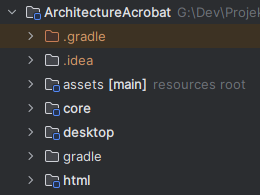
The assets folder contains graphics, audio or data files. As is stated in the screenshot, this is the resources root. The core module contains code that will be used by all platforms. Most game development will happen here, since the applied logic should be the same on all platforms. The desktop module contains the DesktopLauncher class, and desktop specific configuration. Same goes for the html directory, although this module also contains all the necessary code to convert the java code of this project to a browser-suitable web application with GWT (Google Web Toolkit).
At this point annotation processing was enabled and the build.gradle for the core module modified, to add Lombok to the project, which is a tool to reduce boilerplate code in Java.
The following subchapters will take a look at the most important places in the code written for this project. This includes all places in which a design pattern was implemented purposefully. The full code is also available on GitHub, as is linked in the Appendix. It is also to be noted that all shown art assets (pixel art with animations, audio) are free assets found in various asset shops. All resources used are linked in the README.md of the GitHub repository.
Player Controller
As a first feature to be implemented, the player movement was selected. Thanks to this, every other feature could be tested immediately. Resulting from previous experience with character controllers in games and the research done for this project, the state (machine) pattern was implemented.
From the game design it was clear that three distinct states should be implemented:
- StandingState for when character idles
- WalkingState for when the player is walking on a platform
- JumpingState for when the player has given the “jump” input or whenever the character is falling
All of these states were added as implementations of the PlayerState interface:
public interface PlayerState {

    void update(float delta);

    void render(SpriteBatch batch, float delta);

    void onEnter();

    void onExit();
}
That way, the update method could be called to execute state dependent business logic, and subsequently the render method to render the player character depending on the state and the updated data from the update method.
During this phase of the implementation, a simple system was added to handle sprite sheets and animations, so that the render method could easily access the desired animation per state.
    @Override
    public void render(SpriteBatch batch, float delta) {
        stateTime += delta;
        TextureRegion currentFrame = AnimationData.IDLE.getAnimation().getKeyFrame(stateTime, true);
        if (currentFrame.isFlipX() != (playerController.getDirection() == -1)) {
            currentFrame.flip(true, false);
        }
        batch.draw(currentFrame, playerController.getCharacterBounds().getX() - 25,
            playerController.getCharacterBounds().getY(), 100, 74);
    }
Input Handling
For simplicity input was handled within the player controller until this point. For higher modularity and therefore higher flexibility input handling was extracted into a separate package and then reconnected to the Player Controller. As is stated in the research section, input handling can benefit from the command pattern, which is why this was integrated as well.
At this point it was unknown, that the Java language level needed to be reset to Java 7, which is why the command pattern was initially implemented via a functional interface, specifically the java.util.function.Consumer class.
public class InputHandler extends InputAdapter {

    private final PlayerController playerController;
    private final Map<Integer, Consumer<PlayerController>> keyDownMappings = new HashMap<>();
    private final Map<Integer, Consumer<PlayerController>> keyUpMapping = new HashMap<>();
    private final Map<Integer, Consumer<PlayerController>> keyPressedMappings = new HashMap<>();
    private final List<Integer> pressedKeys = new ArrayList<>();

    public InputHandler(PlayerController playerController) {
        this.playerController = playerController;

        keyDownMappings.put(Input.Keys.SPACE, PlayerController::jump);
        keyDownMappings.put(Input.Keys.UP, PlayerController::jump);
        keyDownMappings.put(Input.Keys.W, PlayerController::jump);

        keyPressedMappings.put(Input.Keys.RIGHT, PlayerController::moveRight);
        keyPressedMappings.put(Input.Keys.D, PlayerController::moveRight);
        keyPressedMappings.put(Input.Keys.LEFT, PlayerController::moveLeft);
        keyPressedMappings.put(Input.Keys.A, PlayerController::moveLeft);

        keyUpMapping.put(Input.Keys.RIGHT, PlayerController::stopMove);
        keyUpMapping.put(Input.Keys.D, PlayerController::stopMove);
        keyUpMapping.put(Input.Keys.LEFT, PlayerController::stopMove);
        keyUpMapping.put(Input.Keys.A, PlayerController::stopMove);
    }

    @Override
    public boolean keyDown(int keycode) {
        keyDownMappings.getOrDefault(keycode, pc -> {
        }).accept(playerController);
        pressedKeys.add(keycode);
        return true;
    }

    @Override
    public boolean keyUp(int keycode) {
        keyUpMapping.getOrDefault(keycode, pc -> {
        }).accept(playerController);
        pressedKeys.remove((Integer) keycode);
        return true;
    }

    public void update() {
        for (Integer keycode : pressedKeys) {
            keyPressedMappings.getOrDefault(keycode, pc -> {
            }).accept(playerController);
        }
    }
}
The Consumers were then replaced at a later time, by writing a very simple Command interface:
public interface Command<T> {

    void execute(T t);

}
This interface was then implemented inline, as opposed to creating separate classes, because of the small amount of differing commands necessary.
    private final Map<Integer, Command<PlayerController>> keyDownMappings = new HashMap<Integer, Command<PlayerController>>();
    private final Map<Integer, Command<PlayerController>> keyUpMapping = new HashMap<Integer, Command<PlayerController>>();
    private final Map<Integer, Command<PlayerController>> keyPressedMappings = new HashMap<Integer, Command<PlayerController>>();

    private final Command<PlayerController> jumpCommand = new Command<PlayerController>() {
        @Override
        public void execute(PlayerController playerController) {
            playerController.jump();
        }
    };

    private final Command<PlayerController> moveRightCommand = new Command<PlayerController>() {
        @Override
        public void execute(PlayerController playerController) {
            playerController.moveRight();
        }
    };

    private final Command<PlayerController> moveLeftCommand = new Command<PlayerController>() {
        @Override
        public void execute(PlayerController playerController) {
            playerController.moveLeft();
        }
    };

    private final Command<PlayerController> stopMoveCommand = new Command<PlayerController>() {
        @Override
        public void execute(PlayerController playerController) {
            playerController.stopMove();
        }
    };
Level building and collision detection
With proper movement and input handling available, a first level needed to be created. This includes collision detection, which had not been implemented before, but was instead limited to the player walking across the y-axis of the game screen.
Since libgdx does not provider a game editor or a UI to create levels, it was decided to read the structure of any given level from a json file. For this, the game screen was split into a 60 by 34 grid. Within that grid com.badlogic.gdx.math.Rectangle s could be placed as platforms, which would then be rendered as rectangular boxes consisting of quadratic platform pieces.
{
  "playerStartX": 1,
  "playerStartY": 1,
  "platforms": [
    {
      "x": 0,
      "y": 0,
      "width": 60,
      "height": 1
    },
    {
      "x": 28,
      "y": 1,
      "width": 4,
      "height": 3
    }
  ]
}
Logic was added to player controller to check for collision with any of the given platforms during an update, and on collision put the player character back to where it was before.
Interaction system
With the first level designed and added to the game, and a second level planned, a level switch needed to be implemented. The player character was supposed to be moved to the next level once it had reached a target door, which describes as simple “Interaction” of the player character with the level. The same needed to be implemented for a Button, which was planned to be built into the second level, that move platforms once the player character collided with the corresponding button. Therefore an interaction system was implemented.
This system uses the Observer pattern. Instead of gaining direct access to the data contained in the PlayerController, the Level is notified of changes, being given the data as parameters. The Level then checks for interaction with each registered Interactable object, and executes the given Interaction.
    @Override
    public void update(String paramName, Object oldValue, Object newValue) {
        for (Interactable interactable : levelData.getInteractables()) {
            if (interactable.detectInteraction(newValue)) {
                interactable.handleInteraction(newValue);
            }
        }
    }
This decouples the level with its interactable objects from the PlayerController, while stilll being able to use the data (i.e. player character position).
The interactables also needed to be added to the level initialization logic, so that it would be possible to add them via the json file as well.
With all of these systems completed and a few improvements and utility code inbetween, the game turned out playable and extensible with new interactables or levels.
Audio
As one of the final steps in the implementation process, audio was added to the game. Namely background music, ambience, footsteps, level success and button click sounds. As mentioned in the research section, this would be a good candidate to show off the singleton pattern.
Libgdx differentiates between Music and Sounds, so a system was added to load needed files into memory and return instances of played sounds/music as is needed.
public class AudioController {

    private static AudioController instance;

    private final EnumMap<MusicTrack, Music> musicMap = new EnumMap<MusicTrack, Music>(MusicTrack.class);
    private final EnumMap<SoundTrack, Sound> soundMap = new EnumMap<SoundTrack, Sound>(SoundTrack.class);

    private AudioController() {
    }

    public static AudioController getInstance() {
        if (instance == null) {
            instance = new AudioController();
        }
        return instance;
    }

    public void initialize() {
        for (MusicTrack value : MusicTrack.values()) {
            musicMap.put(value, Gdx.audio.newMusic(Gdx.files.internal(value.getPath())));
        }
        for (SoundTrack value : SoundTrack.values()) {
            soundMap.put(value, Gdx.audio.newSound(Gdx.files.internal(value.getPath())));
        }
    }

    public Music getMusic(MusicTrack musicTrack, boolean looping, float volume) {
        Music music = musicMap.get(musicTrack);
        if (music == null) {
            music = Gdx.audio.newMusic(Gdx.files.internal(musicTrack.getPath()));
            musicMap.put(musicTrack, music);
        }
        music.setLooping(looping);
        music.setVolume(volume);
        return music;
    }

    public Sound getSound(SoundTrack soundTrack) {
        Sound sound = soundMap.get(soundTrack);
        if (sound == null) {
            sound = Gdx.audio.newSound(Gdx.files.internal(soundTrack.getPath()));
            soundMap.put(soundTrack, sound);
        }
        return sound;
    }
}
This is also were a possible issue with the pattern arises: It delays the instance initialization until the first access to the Singleton. Loading audio files into memory takes longer than is realistically available between two frames. To circumvent issues during gameplay, a initialize method was added to the AudioController, which is executed before the first frame of the game is loaded.
Deployment and Release
Once the implementation phase was completed, the game was supposed to be built for the desired platforms (windows, browser). Whilst the desktop build was executed without any issues, the html build with GWT was blocked. The way lombok was integrated earlier in the process was not compatible with GWT, and a handful of tools and libraries were used that GWT does not support.
The code base was therefore setup from scratch, this time with gdx liftoff . This produced a different project structure, with the possibility to build Lombok code with GWT. The game code and assets were then copied into the new project and any code using unsupported libraries was replaced to use self-written implementations instead. This included the observer pattern, all functional interfaces (command pattern), replacement of the jackson library which was used for reading the level json files, and the tweening library used for platform movement.
With the html build fixed, a few more steps were taken to change the viewport size and therefore support smaller displays, and to add explanatory levels to the game.
Play testing and feedback
Although this project did not plan to include playtesting, a few volunteers were found and a bit of feedback was already gathered. The following lists all points that were mentioned and could be improved upon in the future.
Coming from a very experienced platformer player:
- Acceleration would be cool (it’s currently mono speed)
- the long, unscalable jump feels annoying and very slow (for a platformer veteran)
- A connection between the switches and platforms would be cool. Either by color or with a cable
- there are lots of places in the levels where you want to/can go, but it doesn’t help (2nd level to the left of the start and then top left)
- Levels always end “by rule” at the edge of the screen. This feels strange - I would expect to fall out or for the level to continue. The whole “city” visual design doesn’t make me expect to be locked in a screen either.
Translated with DeepL.com
Coming from a game design professional:
- It took me one or two levels to really recognize the level against the background. I was particularly surprised by these three pillars in the first level
- I would like the buttons to be a bit more visible. the red is very subtle. If you want to make them even more beginner-friendly, you can even connect them to the platform with a cord
Translated with DeepL.com
Coming from a non-gamer:
- I had classified the red hatching of the moving blocks as a “danger” and wanted to avoid them at first
Translated with DeepL.com
Conclusion
This project has provided a comprehensive exploration into the design and implementation process of a 2D platformer game, which serves as an educational tool in software engineering. The journey began with understanding the game design, setting, art style, and character controller, which were essential in creating an engaging and intuitive gaming experience.
The implementation phase involved using LibGDX to set up the project and the creation of a player controller, input handling, level building, collision detection, and an interaction system. The integration of audio added another layer of immersion to the game. Despite facing several challenges during the deployment and release phase, especially with the html build, solutions were found which allowed for successful completion of the project.
Feedback received from playtesting with various types of players highlighted potential areas for improvement, providing valuable perspectives for future development. These include enhancing the game’s visual clarity, improving the visibility of buttons, and refining the connection between switches and platforms.
In conclusion, this project demonstrates the potential of game development as an educational tool for software engineering. It underscores the importance of careful planning, selection of appropriate design patterns, and the necessity of iterative testing and feedback. The lessons learned from this project can serve as a valuable resource for future game development projects.
Document
Your browser can't display PDFs inline. Open in new tab ↗